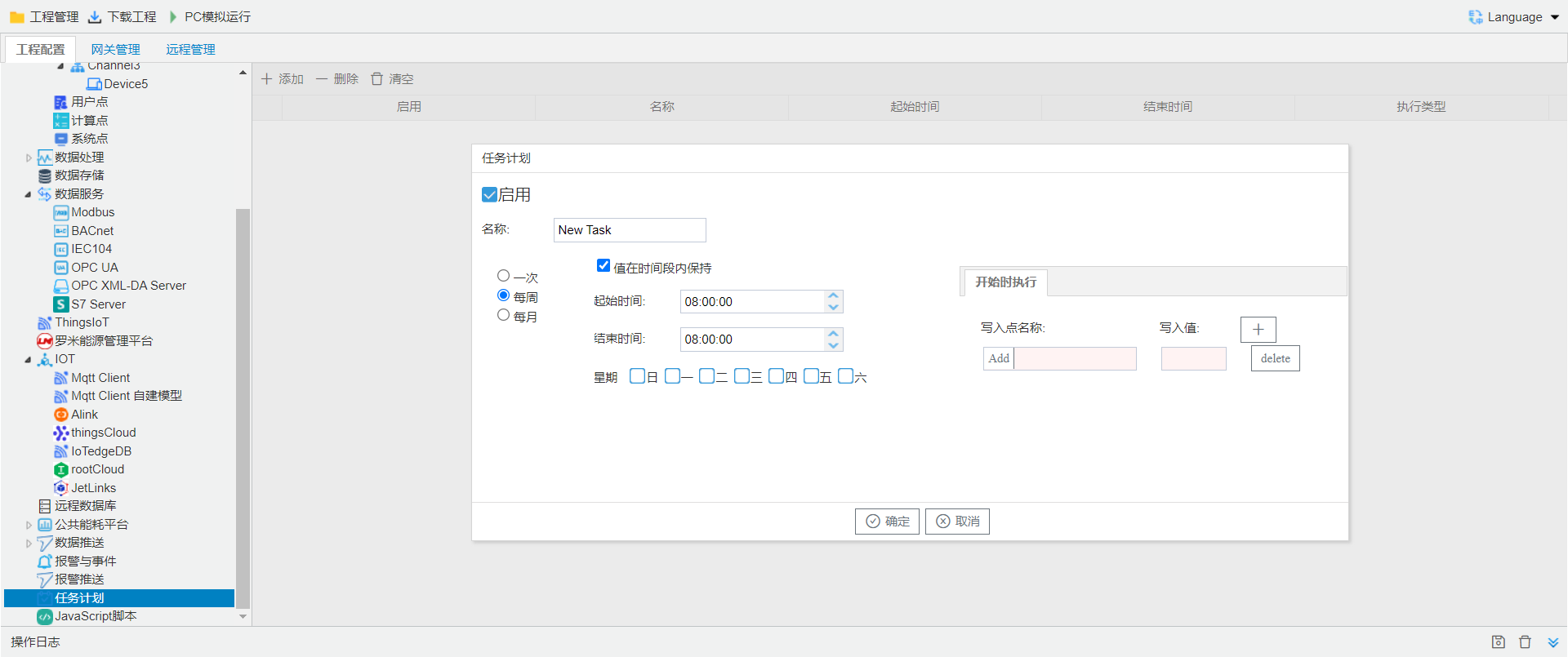
2.11 Scheduled Tasks
Function Overview
The IoT gateway provides powerful scheduled-task functions, allowing users to create scheduled tasks based on actual requirements and automatically write values to multiple points during specified weekdays and time periods. This function is suitable for scenarios that require periodic operations or scheduled control. It helps users implement automated management, reduce manual intervention, and improve system operation efficiency.Key Features
Scheduled Task Creation
Users can create multiple tasks and set execution cycles such as daily or weekly time windows.
Multi-point Writing
Multiple register values can be written simultaneously when a task runs to satisfy complex application scenarios.
Flexible Configuration
Tasks can be scheduled by weekday and time period to fit diverse usage requirements.
Time Synchronization
Task execution relies on the gateway’s system time. Please calibrate the gateway clock in advance.
Function Configuration
Create a task schedule to set values for multiple points by specifying the day(s) of the week and time period. Before using the task scheduling function, please calibrate the gateway time first.- Click the Add button;
- Edit the task schedule name;
- Configure the start time and period for the task schedule;
- Define the actions to be performed when the task schedule starts ;
- Click [OK] to complete configuration.